
Eagle Viewalways in view
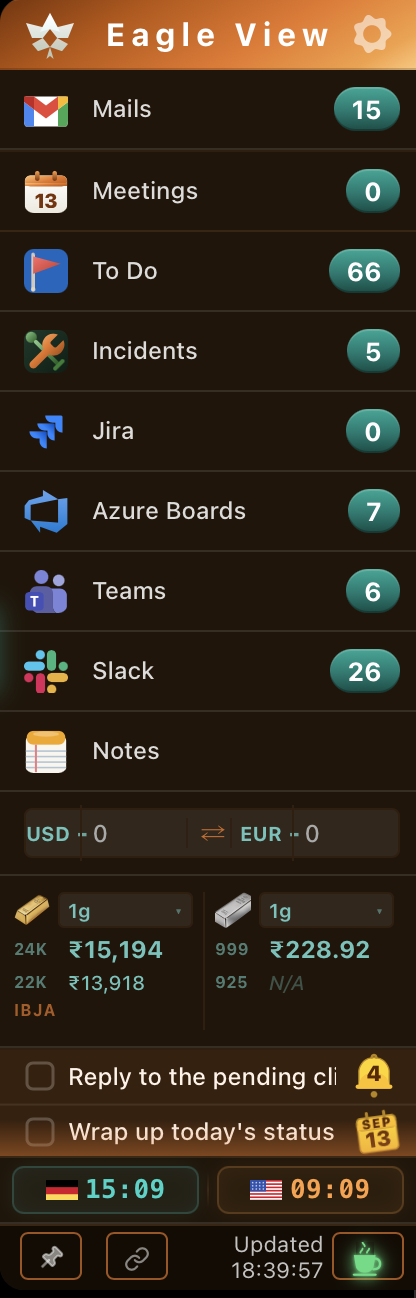
Everything you need,
nothing you don't
All your work tools in one slim sidebar. Always visible, never in the way.
Unified Mail
Connects to both Outlook and Gmail. See unread count, today's mails, and flagged items — all from one place.
Outlook + GmailLive Meetings
See today's calendar events with real-time countdown. One-click join for Teams and Google Meet calls.
● Live countdownJira Issues
Track assigned Jira tickets with status pills. Update status transitions directly from the widget — no browser needed.
Status transitionsSmart Notes
Inline notepad with drag reorder, reminder bells, and checkbox completion. Your to-do list is always visible.
With remindersWorld Clock
Track two timezones simultaneously. Choose from 26 cities. Auto-updates every second from your system clock.
26 timezonesFull Customisation
Drag to reorder rows, hide what you don't need, set refresh intervals, resize the window — completely your way.
5 themesUp and running in minutes
Download
Grab the DMG for Mac or EXE for Windows. No account needed to install.
Install
Drag to Applications. Launch Eagle View — it appears on your screen edge.
Connect
Sign in with your Outlook or Gmail account. One-time setup, always secure.
Done
Eagle View stays on top of all windows. Always there. Never in the way.
Built for your OS
Native Tauri app — tiny footprint, feels fast and familiar on every platform.
macOS
Available for Apple Silicon (M1/M2/M3/M4) and Intel. Transparent sidebar, native window management, stays above all apps.
Available nowWindows
Full Windows 10 & 11 support. Simple installer — double-click and follow the steps. System tray icon included.
Available now5 handcrafted themes
Switch instantly from the settings panel. Every theme is designed to look great in any environment.
Start using Eagle View today
Free to download. No subscription. No sign-up required.
Just install and connect your Outlook or Gmail account.